They want a balanced setup that supports long gaming sessions without adding eye strain. This introduction shows how to layer light to protect vision and boost mood.
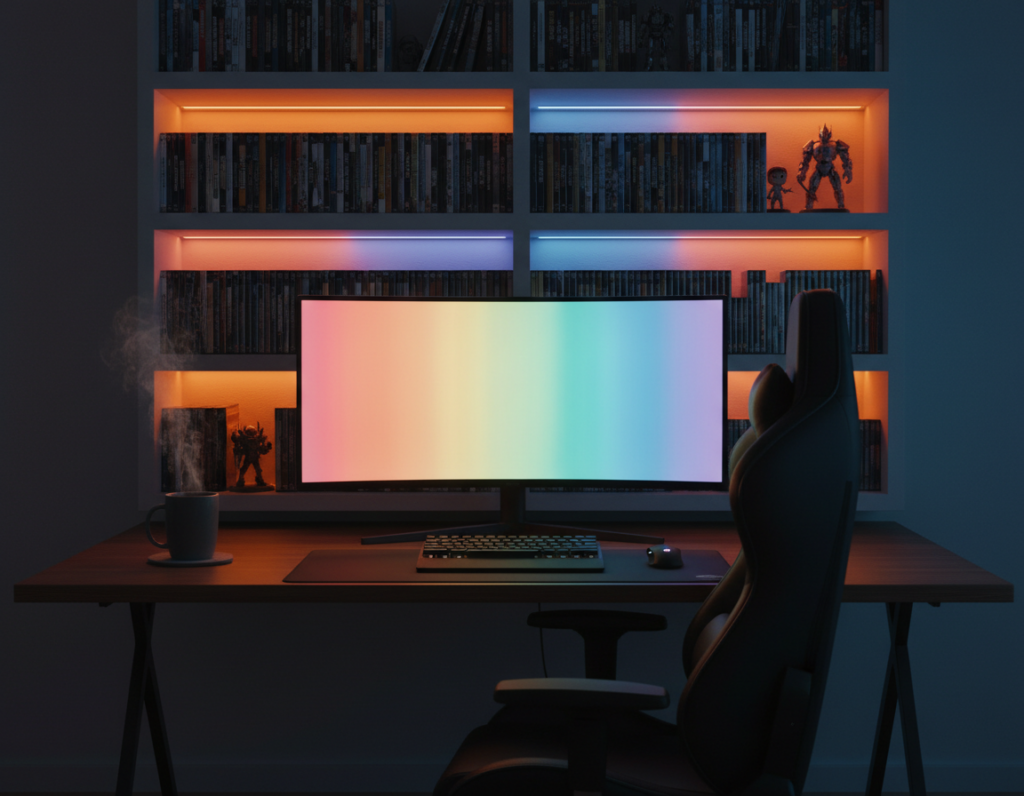
Proper room lighting blends bias lighting, light bars, and subtle accent lights so the screen sits comfortably against the background. Smart lighting and light strips help tune color temperature and glow to match the game and reduce eye fatigue.
Good designs separate task, screen, and background zones. That approach highlights specific areas of the space while keeping overall brightness low.
For practical steps and examples, readers can check a focused guide on setup ideas at lighting setup ideas. Simple control and the right products make it easy to enhance gaming experience without overwhelming the eye.
The Role of Lighting in Your Gaming Environment
Well-placed lights shape the mood and performance of any serious game setup. Proper lighting turns an ordinary desk into a focused game space. It also helps reduce eye strain and keeps play engaging for long sessions.
Game room lighting sets the atmosphere and supports concentration. The right balance makes scenes pop while preventing glare on the screen. This balance directly helps the gaming experience and player focus.
Designers use several layers to ensure room lighting is functional, not distracting. A mix of subtle backlight, targeted task lights, and soft accent lights creates depth. This approach makes a game room feel dedicated and professional.
“Good lights guide the eye; they make the screen the star without overwhelming the rest of the space.”
- Improves focus during intense matches
- Enhances immersion and visual clarity
- Makes the game area look cohesive and intentional
In short: thought-out lights are a tool, not a decoration. When a player plans choices carefully, they enhance gaming performance and comfort for every session.
Mastering Ambient Lighting Gaming Room Techniques
Good control over your lights can make long play sessions easier on the eyes and more immersive.
The Power of Bias Lighting
Bias lighting reduces eye strain by softening contrast between a bright screen and the wall. Super Bright LEDs offers solutions and installation guidance for reliable bias setups.
Using led strips behind the monitor creates a gentle glow that keeps focus on the screen. Incorporating infinity mirror pieces like the HyperCube Nano or HyperCube10 adds depth while providing a long-lasting LED lifetime.
Utilizing Smart Controls
The HyperDrive LED Kit puts precise control in your hands with app-based color and mood settings. Smart control lets players sync colors to gameplay or set steady tones for extended sessions.
“The best setups combine bias lighting and accent lights so the space feels alive without being too bright.”
- Install strips in aluminum channels for a clean finish.
- Use app control to match colors with your favorite titles.
- Pair bias sources with subtle accent lights for the ideal atmosphere.
For examples of best gaming setups, see curated product lists and layout tips that suit American homes and student apartments.
Essential Layers for a Balanced Setup
A well-layered setup starts by adding task fixtures that light the desk without blasting the rest of the space.
Integrating front-facing task lighting makes peripherals easy to see and trims contrast that causes eye strain. The BenQ ScreenBar Halo 2 is a strong choice here.
The ScreenBar Halo 2 uses ASYM-Light to illuminate the desk while avoiding screen glare. Its 24-degree adjustable lamp head directs light where it’s needed, so keys, mouse, and notes stay visible during long sessions.
- Task lights reduce the contrast between screen and wall, lowering eye strain.
- Pair high-quality led strips and light bars with task fixtures to control color and intensity.
- Choose proven products to keep the game room functional and comfortable for hours.
These types lighting work together to create a professional space. Proper task illumination helps someone stay focused on the game without distractions or harsh glare.
Strategic Placement to Avoid Excessive Brightness
Place each fixture so it highlights the play area without making the whole space feel bright. A few well-placed sources give depth and keep the screen as the visual focus.
Diffusing LED Strips
Use frosted lenses in aluminum channels to diffuse led strips and remove hotspots. This creates a soft, even glow that reduces glare on shiny surfaces.
Tip: channel mounting plus frosted covers prevents concentrated beams and cuts down on eye strain during long sessions.
Managing Reflective Surfaces
Reflective gear and glossy decor can bounce light into the monitor. Position accent lights so they illuminate walls and shelves, not the screen.
“Soft, controlled output keeps reflections under control.”
Choosing the Right Color Temperature
Pick 3000K for a gentle, cozy glow or 6500K to match a computer screen. Mixing those tones helps align the screen and background without overwhelming the space.
- Use smart lighting controls to tune the glow and mood.
- Highlight specific areas with low-intensity accent lights to avoid overall brightness.
- Choose reliable products like HyperCube infinity mirrors for steady, high-quality led output.
“The right placement and diffusion make a game area feel professional and easy on the eyes.”
Protecting Your Vision During Long Sessions
Long play can wear on the eyes unless the setup balances front and back light sources.
Combine bias lighting with front-facing light bars to reduce eye strain during extended gaming sessions. A soft rear glow lowers contrast so the screen is easier to view.
The BenQ ScreenBar Halo 2 pairs a desk-facing lamp with a rear bias light to create a stable, glare-free zone. That design helps minimize eye fatigue and keeps performance steady over hours of play.
Keep color temperature consistent. Matching the color of your task lights, led strips, and any background glow lets the eye adjust faster and reduces fatigue.
- Use low-intensity strips behind the monitor for a gentle halo.
- Add a quality light bar for desk tasks and peripheral visibility.
- Maintain steady color temperature to support long sessions.
“Layering lights creates a balanced environment that protects vision without making the whole space too bright.”
Conclusion
Smart, layered light choices make the best gaming upgrade for style and comfort.
Combining bias sources with task bars and subtle accent lights creates an immersive atmosphere that protects eyes during long gaming sessions. Use quality strips, reliable light bars, and smart controllers to match colors to gameplay and avoid glare on the wall.
Keep the overall output low and focused so the screen stays central. A well-planned setup will enhance gaming experience, support performance, and preserve visual health.
Start with a few tested products and fine-tune intensity and hue to suit play. The right approach turns any game room into a professional, comfortable space for long sessions.